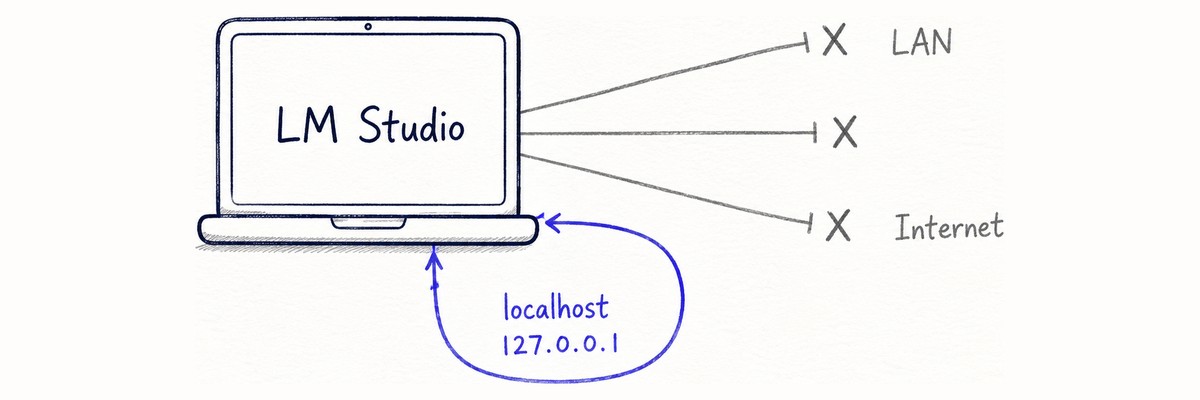
Running a Model Locally Is Not the Same as Keeping It Local
Notes from writing Windows scripts that keep a local LLM's own processes off the network as far as they can, and load only one approved model. Why the firewall became the boundary instead of the app's own settings, why rule shape matters more than rule presence, and what a first run on real hardware actually showed.

I needed a local language model for work, so I wrote three Windows PowerShell scripts around one goal: run a single approved model while blocking, as far as these scripts reach, any traffic the LM Studio processes send past the machine. It is not a machine-wide network cut-off.
The distinction that turned out to matter is a plain one. A model sitting on your disk is not a reason the application stays quiet. Desktop LLM apps check for updates, search catalogues, fetch runtimes, and load plugins. Local weights do not switch any of that off.
The three scripts
| Script | What it does |
|---|---|
| Setup | Creates firewall rules (in the default configuration), moves network-related JSON settings to safer values, records state |
| Launch | Audits the recorded state and the rules, then starts and loads only the approved model |
| Restore | Validates a hashed backup and puts the settings files back |
None of them download anything. The application, the runtime, and the model all have to be in place beforehand. The model sits on a shared folder, and setup registers it as a symbolic link, so nobody using it has to look up a model name or touch the application's own settings.
Choosing where the boundary lives
The application's settings file has network-related entries — developer mode, a local service toggle, proxied search, download tokens. Moving those to safer values is worth doing, but it is not a boundary. An update can put them back, and the key names and meanings are internal details I do not control.
So the Windows Firewall became the enforced boundary, and the JSON settings were demoted to defense in depth. The firewall sits outside the application, where the application cannot rewrite it. The settings became the second layer, applied on the assumption that the first one is already holding.
That does not make the firewall airtight. Rules bind to executable paths, so updating the app or a runtime produces binaries that fall outside them. The existing rules do not disappear — the new executable simply is not covered.
Whether this project owns that boundary at all is a deployment choice. The default is that it does, and everything below describes that configuration. Where enforcement is handed to a company's own firewall or EDR instead, the scripts create no rules, audit nothing, and never present the result as something they verified.
That reordering changed how I treat the policy file in the repository. There is a baseline JSON documenting the enforced values, but editing it changes nothing at runtime. The values that actually get applied live inside the scripts, and the scripts verify their own work. If the file were authoritative, swapping it would be enough to quietly weaken the whole thing. It stays as a human-readable table to compare against your own policy.
Rule shape matters more than rule presence
Creating firewall rules was the easy part. Confirming a rule still does what it was created for was not.
A rule can exist and still leak:
- the protocol has narrowed to TCP only
- the rule applies to the Private profile only
- the remote port has been limited to 443
- it is disabled
Every one of those still shows up as "a rule exists."
So the launch-time audit checks shape rather than existence. It compares profile, protocol, local and remote ports, interface type, service, the target executable, and the address ranges — and refuses to launch if any single one of them falls short. The behavior tests plant the first three defects in turn and assert that each is rejected.
Writing "loopback only" as address ranges
There is no direct way to say "block everything except loopback." Instead of an exclusion, you split the space around it:
0.0.0.0-126.255.255.255
128.0.0.0-255.255.255.255
::2-ffff:ffff:ffff:ffff:ffff:ffff:ffff:ffff
Stop just before 127.0.0.0/8, resume just after it, and start the IPv6 range one address past ::1. What stays permitted is 127.0.0.0/8 on IPv4 and ::1 on IPv6, and those three lines are what "loopback only" actually consists of.
The parts I deliberately left manual
Setup refuses to run while the application is still open. Terminating the processes would have made it fully automatic, and I decided against it: unsaved work can disappear, and a write can be interrupted mid-flight.
Restore follows the same instinct. It accepts only the original backup taken during setup — never one written at launch time, and never a restore-safety copy. It does not pick the newest directory; a newer launch backup loses to an older original. A hash mismatch stops it. A backup belonging to a different profile stops it. A path outside the managed backup root stops it.
The firewall rules are a separate decision. Restore leaves them in place by default, because putting the settings back and reopening the network are two different things. Removing the rules takes an explicit flag. Switching a deployment over to company-owned enforcement clears only the rules this project created — never Windows Firewall itself, and never anything the organization put there.
The result is a tool that refuses more often than it acts. For this kind of work, doing nothing when the preconditions are not met is the correct response rather than a limitation.
Finding runtimes by location, not by name
Looking up a running runtime by process name feels like the obvious approach. But runtimes multiply and get renamed.
The tests place a process under an unfamiliar name and confirm it is still detected — because the check looks at the path, asking whether the executable lives under the profile's runtime directory. You do not need to know the name if you know where it runs.
Where the first real run stopped
Everything above is the automated tests talking. There are two suites, static and behavioral, and both pass. Neither one touches UAC approval, a real firewall, or GUI startup.
On an actual Windows machine, the first thing that stopped was in the gap those suites leave. Setup could not get past waking the LM Studio service in the background: the call sat on its "starting" message and never came back, and clearing a stale lock file changed nothing. It failed closed exactly as designed, which is not the same thing as working.
So the dependency came out. Model and runtime validation moved from setup into the first secure launch. Setup now stops at a recorded "model not decided yet" state; the first launch brings up the GUI as a normal user, checks the runtime and the memory estimate, and commits the identities only once the model has actually loaded.
Did the traffic stop
Then the run went through. On the one machine and configuration I checked, the traffic it was meant to block was blocked.
The check was not reading the firewall console. It was trying to make the traffic happen: update checks, catalogue and model search, fetches from the command line. Every one of them failed with fetch failed, and the same string is in the logs.
Two TCP listeners were left:
127.0.0.1:41343 LM Studio internal API
127.0.0.1:63377 inference runtime
**The 0.0.0.0:8080 that used to be there was gone.** That one difference is what the opening claim comes down to. Something that had been listening on every interface is not listening at all once the scripts have run. The public API is also set to skip auto-start, with its saved bind address pinned to 127.0.0.1.
The launcher inspects the real TCP listeners twice — once the GUI is ready, again after the model loads — and treats anything bound beyond localhost as a failed start. Comparing rule shape was not enough by itself; the outcome gets checked too.
Still a preview
What this confirms is one Windows machine, one configuration, one run. It is not a sweep across Windows builds, LM Studio versions, GPUs, and runtimes. The version stays at preview.
Known limits
- Firewall rules bind to executable paths. Updating the app or a runtime produces new executables outside those rules. The launcher detects the drift and stops, but it does not repair anything — setup has to be re-run after every update.
- Loopback stays open. Any unauthenticated local server is still reachable from other processes on the same machine.
- Where the model lives on a shared folder, LAN and SMB traffic is required. The rules cover LM Studio's own executables, not the file-sharing traffic Windows itself performs. A strictly disconnected setup needs the model stored locally.
- On managed corporate devices, Group Policy can forbid adding local firewall rules. Setup stops there rather than reporting protection it did not apply. There is also a mode that hands enforcement to the organization's own controls, and in that mode the scripts never present it as something they verified.
- Software with local administrator rights, and anything running in the kernel, sits outside this mechanism entirely.
This is not a sandbox, a VM, or a container. It is an existing application fenced in slightly, using facilities Windows already ships with.
Even so, the gap between running a model locally and keeping its traffic local is narrower than it was.
The scripts are on GitHub under MIT — lmstudio-windows-hardening.