NotesBefore You Send

What Is a Phishing Email? Four Steps, and Why Checking the Sender Stopped Working

Six Japanese public sources on how phishing email works, read side by side. In July 2026, only about 26.5% of phishing mail reaching one monitored address was spoofed — the rest came from the attacker's own domain and mostly passed DMARC. Two documents from the same body disagree about whether you can still spot a fake by its writing.

Before You Send Research Note

Written by k-wada (Legacy Tools)

この記事を日本語で読む

On this page
  1. What each source can answer
  2. The definition, in the sources' own words
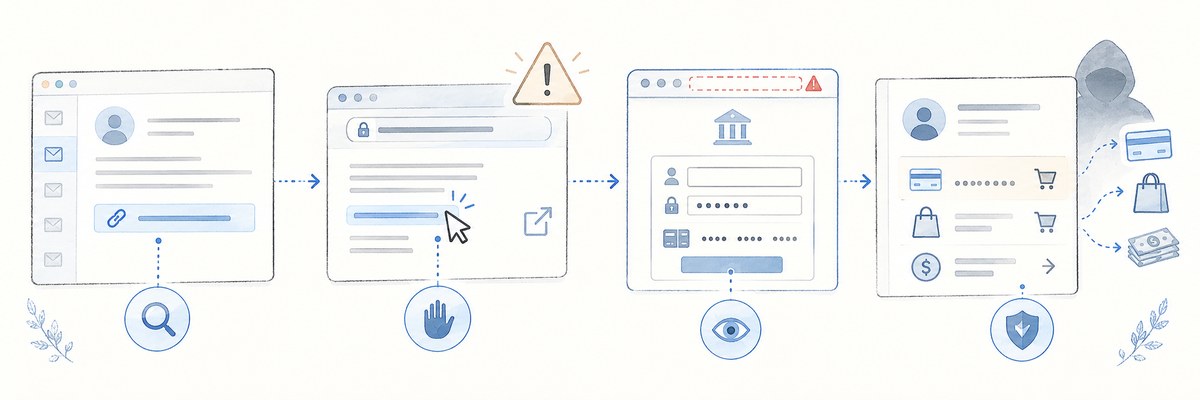
  3. The four steps
    1. 1. A message arrives that looks legitimate
    2. 2. You open the link
    3. 3. You type into a convincing copy
    4. 4. The stolen details are used on the real service
  4. One case, and the pattern around it
  5. Sender and URL: forgery was not the main pattern
  6. Two documents from the same body, pointing opposite ways
  7. 66,119 is reports received — and it went down
  8. The 2026 edition moved the minimum line to "do not type"
  9. If you already entered something
  10. What these six sources cannot support
  11. Beyond the sources — my own reading
  12. Sources
A hand-drawn illustration of four screens joined left to right by dotted arrows. The first is a mail app, an inbox list beside an open message with one link row outlined in blue. The second is a browser where a cursor is clicking that link, with external-link marks alongside and a warning triangle floating above. The third is also a browser, but its address bar is ringed by a red dashed outline with a red warning mark, and below a building symbol sit form fields for a username, a password and a card number, with a submit button. The fourth is an account statement listing card and shopping rows, with dotted arrows running off to the right towards a card, a shopping bag and banknotes, and a hooded figure standing behind it.
A conceptual illustration of the article. It is not a screenshot of any real mail app or website.

Advice to "watch out for phishing emails" is easy to find. What the mechanism actually is, and where in that mechanism you can realistically stop, is harder. On 8 September 2026 I read six public sources on it — all from Japanese bodies, so the measurements are Japan-specific, though the mail-protocol parts are not. The mechanism was consistent across all six. Whether you can still recognise a fake by how it reads was not: two documents from the same organisation say opposite things.

What each source can answer

Table 1 The six sources read for this article: what each contains, its date, and what it cannot answer. All retrieved and checked on 8 September 2026.
SourceWhat it containsDateWhat it cannot tell you
National Police Agency, "Phishing countermeasures"Definition, case reports, prevention adviceNo publication or update date shown on the pageCounts, losses, how often each method occurs
National Consumer Affairs Center, Mimamori bulletin 550One consumer case and advicePublished 3 Sep 2026Counts, trends, how typical the case is
IPA, consumer helpdesk bulletinWhy the visible sender field can be forgedPublished 21 Sep 2021What is arriving now
Council of Anti-Phishing Japan, July 2026 monthly reportMeasured reports, URLs, brands, and observed trendsJuly 2026 data, published 17 Aug 2026Victim counts, success rates
Council of Anti-Phishing Japan, Anti-Phishing Guideline 2026 (operator edition)A year-scale reading of the situation (preface) and measures for service operatorsPublished 1 Jun 2026Individual cases, month-by-month figures
Council of Anti-Phishing Japan, Anti-Phishing Guideline for Consumers 2026What a reader should do, and who to contact after an incidentPublished 1 Jun 2026Counts, measurements

The IPA bulletin is five years old. Its subject is how the email protocol works, which has not changed, but it cannot stand as evidence of current activity — the monthly report covers that.

The definition, in the sources' own words

Japan's National Police Agency defines it on its phishing countermeasures page (external site, Japanese) as impersonating a real service or company, using fake email or SMS to steer people to a fake site, and then stealing credentials or infecting the device with malware. The Council of Anti-Phishing Japan's consumer guideline (PDF, external site, Japanese) defines it as impersonating a real organisation to obtain usernames, passwords, account IDs, PINs and card numbers.

What separates it from ordinary spam is the goal: not to advertise, but to get you to type something. The July monthly report lists the pretexts in circulation — order and delivery notices, refunds, payment-detail updates, fraud-detection alerts, identity verification, expiring points or miles, and survey requests. The police agency's four published case reports follow the same shapes: a bank "important notice", a card company "card details confirmation" SMS, an online store "your account has been locked after a suspicious login", and a courier's failed-delivery SMS.

The four steps

1. A message arrives that looks legitimate

It carries the name of a bank, card issuer, retailer, courier or mobile carrier you already use. The name on screen proves nothing. IPA's bulletin, Do not readily trust the apparent sender information on an email (external site, Japanese), gives the protocol-level reason: the visible display name and the visible sender address are both values the sending side can set freely. Its worked example shows a message whose display name is "Amazon Customer Service" and whose address is the genuine domain amazon.co.jp. The police agency adds that mobile mail apps often show fewer fields than desktop clients, making the judgement harder still.

2. You open the link

"Confirm", "Sign in", "Update your payment details". On the question of judging a link by eye, the police agency is blunt: links in email can be forged, lookalike domains are common, and telling real from fake by appearance is "extremely difficult".

3. You type into a convincing copy

The consumer guideline says phishing sites are usually built by copying the real site, and that distinguishing the copy from the original is "extremely difficult". What gets captured is whatever the form asks for: ID, password, card number, PIN, one-time code.

4. The stolen details are used on the real service

Accounts get taken over and money moved; card numbers turn up as purchases the owner did not make.

One case, and the pattern around it

The National Consumer Affairs Center of Japan published Treat email from companies you use regularly as possible phishing too (external site, Japanese) on 3 September 2026, as issue 550 of its Mimamori bulletin — a one-page series aimed at people who look out for older relatives and neighbours. The case:

An email arrived on my smartphone under the name of an app I use regularly. It said things like "the registered payment method needs confirmation" and "if the update is delayed you will not be able to buy apps in the store", so I opened the URL in the message, entered my credit card number and updated the payment details. Afterwards I received an email telling me about roughly 200,000 yen of online shopping. What should I do? (Person in their 80s.)

No unfamiliar company was involved. The name belonged to a service the person actually used — which is the point the bulletin makes: treat mail and SMS as suspect even when it comes from a company or public body you deal with every day.

Sender and URL: forgery was not the main pattern

This was the biggest gap between what I expected and what the measurements said. "The sender can be forged" is true. But in the July 2026 monthly report (external site, Japanese), most of what actually arrived that month was not forged.

So the common pattern was not impersonating someone else's domain, but registering a domain and authenticating it correctly. Passing authentication does not mean the sender is the company. It means the owner of that domain sent the message; who owns the domain is a separate question.

The URLs behaved the same way. In the same report, hostnames under amazonaws.com used as-is accounted for about 23.2% of reported URLs. URL shorteners, redirects via sendgrid.net, and other legitimate-service domains chosen because filters are unlikely to flag them accounted for about 25.8%. By top-level domain, .com was about 80.8% — that last share is counted over reported URLs including duplicates, so its denominator differs from the 43,267 in Table 2.

Two documents from the same body, pointing opposite ways

Awkward Japanese and sloppy design used to be usable signals. The preface to the Council's 2026 anti-phishing guideline (PDF, external site, Japanese — the edition written for service operators) says that has stopped working: attacks using generative AI for natural phrasing and individually tailored messages became prominent, telling them apart by unnatural Japanese or obvious errors has become difficult, and awareness-raising alone is no longer enough to prevent harm.

Two and a half months later, the same organisation's July monthly report says something that reads the other way:

However, plenty of messages were also seen that a person would find far too unnatural — no sender brand or contact details in the body, phrasing no real service would use when writing to its users, subject lines and sender strings written right-to-left — even though they got past the spam filters.

The guideline's wording is worth keeping intact, though: it says awareness-raising alone is insufficient, not that it is pointless.

66,119 is reports received — and it went down

Table 2 Reports received by the Council of Anti-Phishing Japan. These are reports, not confirmed victims. URL counts are deduplicated within each month. Source: the Council's monthly reports (June 2026 published 16 Jul 2026; July 2026 published 17 Aug 2026).
MonthReportsChangeUnique phishing URLsBrands abused
June 202672,370about 42.6% down42,24198
KeyJuly 202666,119about 8.6% down43,267101

For the 101 abused brands, the sectors the report names are 19 credit and consumer finance, 16 telecoms and mail services, 10 e-commerce, 10 online services, 7 banks and 6 payment services. Those do not add up to 101 — the report lists the main sectors rather than a complete breakdown. What does come through is that card issuers are not the whole picture.

The longer arc is in the guideline preface: during fiscal 2025 monthly reports exceeded 200,000 in some months, against a level below 100,000 a month three years earlier — which the Council reads as substantial growth over several years. Quote either the year or the month alone and you get a different story.

The 2026 edition moved the minimum line to "do not type"

The consumer guideline introduced a section that did not exist before: three basic actions, chosen for 2026 as the minimum worth remembering, deliberately phrased as concrete behaviour.

  1. Let technology help — turn on multi-factor authentication, passkeys, spam and SMS filtering, web filtering, anti-virus.
  2. Careful where you type — do not enter IDs, passwords or personal data on a page you reached from a link in mail or SMS; open the site from a bookmark or the official app and enter it there.
  3. Ask someone — family, friends, police, the consumer hotline, the spam consultation desk.

None of the three is about spotting a fake. Read next to the preface about generative AI, that looks deliberate.

Where exactly to stop varies by one step between sources.

Table 3 The first action each source puts forward, and which of the four steps it precedes. Sources: National Police Agency "Phishing countermeasures"; Council of Anti-Phishing Japan consumer guideline 2026 (1 Jun 2026); National Consumer Affairs Center bulletin 550 (3 Sep 2026).
SourceFirst action statedWhere it stops you
National Police AgencyDo not click links in email or SMSBefore step 2
Consumer guideline 2026Do not type credentials on a page reached from a link; open from a bookmark or official appBefore step 3
KeyConsumer Affairs Center 550Do not open the URL at all; and if you did, do not enter card detailsBoth

What they share is the shape: do not use the path the message supplied. If a message says to check your card, open the card issuer's own app yourself instead. That single substitution steps you out of the chain.

If you already entered something

The three bodies advise different things, so they are worth keeping separate.

  • National Police Agency — change the password promptly on every service where that ID and password are used. Contact the bank for fraudulent transfers, or the card issuer for card misuse; some operate compensation schemes and dedicated desks. Report phishing site URLs to the Phishing 110 desk, and report the incident to your local police.
  • Consumer guideline 2026 — contact the relevant bank, card issuer, shopping site or provider and ask them to suspend the account; contacting a bank or card issuer early is better. Change the password you entered, and move to a newly created email address as well, to stop leaked details being reused. It lists police, the consumer affairs centres and the Japan Legal Support Center as places to ask.
  • Consumer Affairs Center bulletin 550 — check card statements often so misuse is noticed early, and call a local consumer affairs centre (consumer hotline 188 in Japan).

What these six sources cannot support

  • A national victim count. 66,119 is reports received by one organisation
  • Any success rate. None of the six gives one
  • Anything about which age groups are targeted. The consumer case is one case, not a statistic
  • A method for judging a specific message. All six say the judgement is difficult
  • Anything outside Japan. All six are Japanese sources

Beyond the sources — my own reading

Everything above comes from the documents. What follows does not; it is how I read them as someone who builds small checking tools.

What stayed with me is that preparing a path that needs no judgement beats improving the judgement. Generative AI made some messages read naturally, and in the same month plenty of crude ones were still landing. Betting on "I will notice" every time, across that spread, is a poor wager. A bookmark and an official app are indifferent to how well the message was written.

For a family member, the mechanism does not have to be memorised. Something as short as "if money or a password comes up, open the usual app instead of the link" already lands on the stopping point the sources specify. Asking someone to spot fakes puts the work in the least reliable place; giving them a place to stop before deciding is an easier thing to ask for.

We do publish a small extension that compares a link's text with the address it opens, but it does not rule a message safe. What these sources agree on is not inspecting the link — it is reaching the site by another route entirely.

Sources

All retrieved on 8 September 2026, with every figure and quotation checked against the original.

  • National Police Agency, "Phishing countermeasures" — published by the Cyber Police Bureau / no publication or update date shown on the page / external site (Japanese)
  • National Consumer Affairs Center of Japan, "Treat email from companies you use regularly as possible phishing too" — Mimamori bulletin no. 550 / published 3 September 2026 / external site (Japanese; the leaflet PDF carries the same content)
  • IPA, "Do not readily trust the apparent sender information on an email" — Information-technology Promotion Agency, Japan, Security Center, consumer helpdesk bulletin / published 21 September 2021 / external site (Japanese)
  • Council of Anti-Phishing Japan, "2026/07 Phishing Report Status" — covering July 2026 / published 17 August 2026 / external site (Japanese; the June 2026 edition was published 16 July 2026)
  • Council of Anti-Phishing Japan, "Anti-Phishing Guideline, 2026 edition" — Technical and Institutional Study WG / published 1 June 2026 / operator edition / PDF, external site (Japanese; quoted from the preface)
  • Council of Anti-Phishing Japan, "Anti-Phishing Guideline for Consumers, 2026 edition" — published 1 June 2026 / PDF, external site (Japanese; quoted from sections 2, 4, 5.3 and the incident-response section)

English renderings of Japanese document titles and quoted passages are mine. None of these organisations endorses or guarantees any particular product or service, and that applies to the tools mentioned here as well.

Tags: statistics・public sources・phishing・email